First, understand you.
Trying a new kind of task? Talk through what you want, which apps you like, and how you usually get it done.
 Lyre OrchestraFollow the idea ↗
An AI companion you can actually talk with.
Your computer does the work. Your phone keeps you in the loop.

You explain what you have in mind. Orchestra asks the questions that matter, helps make a plan, and brings your chosen AI tools together to carry it out. A back-and-forth conversation that keeps moving with you.
Talk through the plan. Then see your apps, your assistant, and the work taking shape, all together.
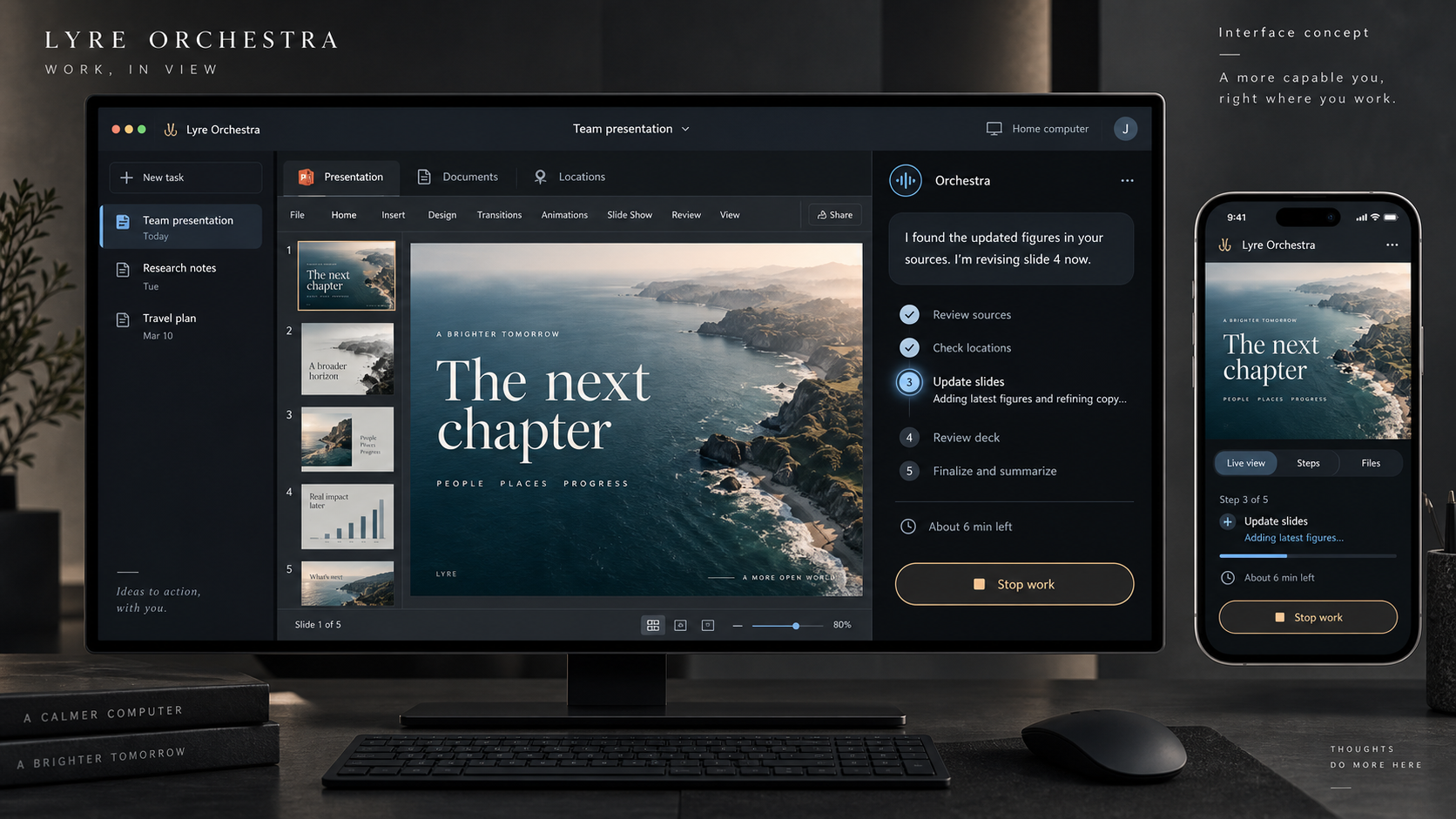
Ask for an updated slide deck. Orchestra talks through the details, estimates the time, and works in your apps. Studio shows the actual work beside the conversation, with progress and work products on your phone.
Update my presentation with the latest text from X, Y, and Z. Check documents M and B too.
Your apps. Your sources. Five clear steps and an estimated time, before work starts.
Talk it through, then give the go-ahead.
Try the document, location and PowerPoint tabs. On the phone, switch between the work, steps and files, or stop the example task. App views, estimates, sources and work products are illustrative. No real files or computer sessions are accessed.
Optional audio is a scripted conversation read by your browser, not a live AI or microphone connection. Planned remote viewing is shown as a simulation; this page does not run a stream.
Your favorite apps are part of how you work. Orchestra is designed to learn those preferences, so you spend less time explaining the same things again.
Trying a new kind of task? Talk through what you want, which apps you like, and how you usually get it done.
For similar tasks, Orchestra can start with your preferred tools and workflow. A new question should fill a gap, not repeat the whole introduction.
Prefer a different app today? Say so. The goal is preferences you can review and change, with your choices guiding the next task.
The vision: bring the AI tools you trust. Choose a different model for research, writing, or building. Orchestra keeps the task connected.
For the work on your desk and the ideas you haven’t found time for yet.
“Look into these options and help me decide.”
Compare research, surface tradeoffs, and turn a pile of information into a clear recommendation.
RESEARCH & DECISIONS“I have an idea for a small app.”
Talk through who it’s for, shape a first version, and follow along as the work takes form.
IDEAS & CREATION“Help me prepare for what’s next.”
Bring the right context together, draft what you need, and get an update when it’s ready for you.
EVERYDAY WORKTalk through the important details, agree on the steps, and hear an estimated time before the work starts. Ask questions or change direction along the way.
See the app being worked in, each step’s status, and the work products on your phone. Review a slide deck, inspect a source document, or stop the work when something needs to change.
Choose the tools and information a task can use. Review important actions before they happen. Cloud AI still follows your chosen provider’s data policies.
Orchestra is a new Lyre concept, not an available product. This page shows the experience we want to build. Join the Lyre community to follow its development and help shape it.
Yes, that is central to the idea. Orchestra would talk through your task, ask follow-up questions, and confirm the plan before starting. The demo offers a scripted conversation read by your browser; it does not listen to you or connect to a live AI.
The idea is to start with an understanding step for a new kind of task: your goal, the apps you prefer, and your usual workflow. For similar tasks after that, Orchestra would use those preferences as its starting point, asking when something is unclear. You should be able to review and change what it remembers. This preference learning is part of the concept, not a feature available on this page.
The planned experience coordinates work on your computer and lets you follow it from your phone. Your computer will need to stay available while tasks run. Using a cloud AI provider may send task context to that provider.
Provider choice is a core design goal, including cloud and local options. We aren’t promising universal compatibility: the supported providers, adapters, and setup requirements are still to be defined.
Orchestra will use Studio’s sidebar, central work area, and agent conversation. The work area shows whichever app the assistant is using: PowerPoint for a deck, a document while researching, or a map when location context is useful. You talk through a plan and time estimate, then follow the steps, inspect work products, and stop or redirect the task from your phone. Remote viewing is planned; the demo illustrates it without running a real stream.
We’re imagining a more natural way to work with AI.
Bring your ideas. Help us find the right first note.