Build on your computer. Use it from anywhere.

A workspace for AI coding agents on your computer. Review each change, then use the live app on your phone.

Get Lyre Studiofor your computerOpen web clientWeb client

Connect from your browser to a computer running Lyre. Keep that computer awake and online.

Google Play: available in Australia, Canada, New Zealand and the United States.

Join Discord for release updates
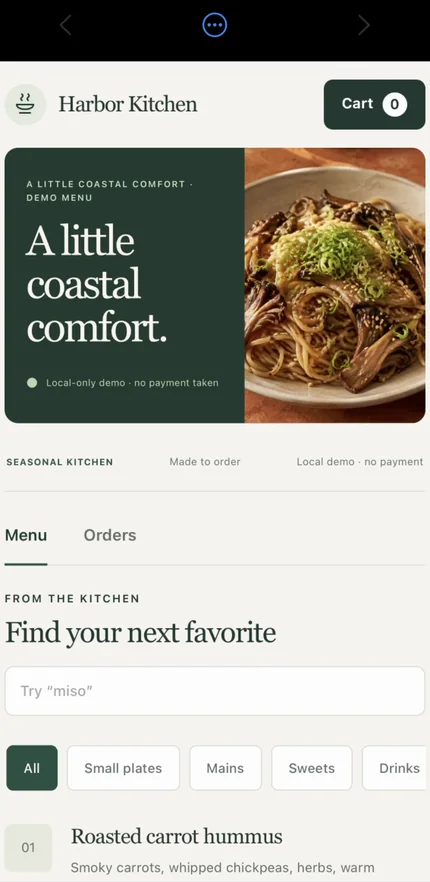
The same Harbor Kitchen app running as a live preview on a paired phone.

Choose your agents, models and tools

Claude CodeCodexGitHub CopilotOpenCodePiOh My PiCursorKimiKiroTrae
OllamaOpenAIGroqSherpa ONNX
GitHubSupabaseStripeMCP
ReactViteNext.jsExpo webCapacitor webHTML & CSSJavaScriptTypeScriptnpmpnpmYarnBun

Use your live app. Reach your desktop. Work across computers.

Preview apps on paired devices, control your desktop, lend models and coordinate tasks across computers. Each host keeps control of access; availability is marked below.

Your app, live on your phone. Not a link.

Live app previews stream the project from your computer to the devices you have paired, with real touch, scrolling and typing. Share one app with a tester and they get that app, not your code, terminals or agents.

Share your app Available now
Harbor Kitchen website running as a live preview on a paired phone.
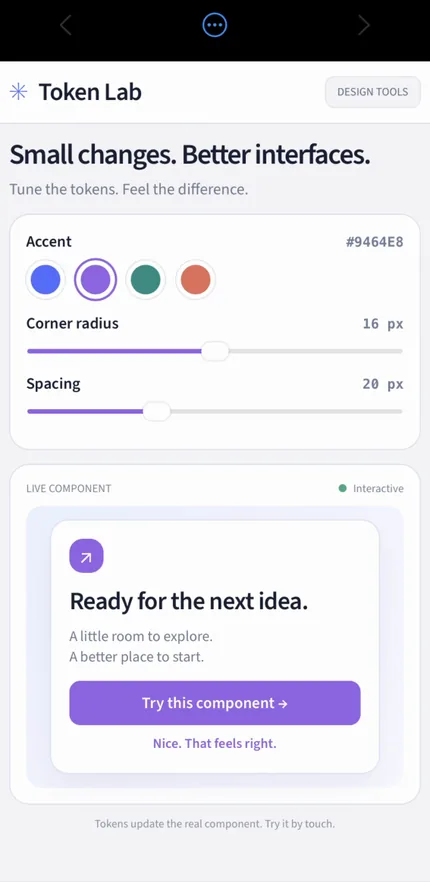
Token Lab tool running as a live preview on a paired phone.
Orbit Run game running as a live preview on a paired phone.

Any app on your computer, from wherever you are.

Remote desktop opens a whole screen, or starts one saved app on its own: a game engine, a simulator, a design tool, whatever your project needs. It is built into Lyre on Windows and macOS hosts: no VNC server, RDP setup or extra helper to install.

  • View-only and control are separate grants
  • Saved apps start and stop on their own
  • An app invitation can never open your desktop

No second remote-access product beside your coding tools: the desktop, the agent and the preview share one connection.

Lend a model. Keep your keys.

Lend selected models from your strongest computer or a connected provider to your other computers or a teammate’s developer connection. Their agent works on their files while your keys stay on the lending computer. Have multiple API keys? Enable automatic key rollover to switch to the next available key when one reaches a rate or usage limit.

Models in Lyre Early access

One task. Every computer you own.

With Orchestrate, describe the job once. A coordinator splits it into one assignment per computer. Each has its own workspace, models and permissions, and the plan runs nothing until you approve. On a single machine, Multitask hands pieces to helper agents instead.

From a request to a tested app, in one window.

Follow one change through Lyre Studio. Harbor Kitchen is a demonstration project; every image is a real capture of the product.

  1. Open a project, or start a new one.

    Point Lyre at a folder you already have, or start from a template. The Files view lists the real project, and your framework and tools stay as they are.

    Local project files stay on your computer and are opened through its project gateway.

    Connect your existing app
  2. Ask an agent for a change.

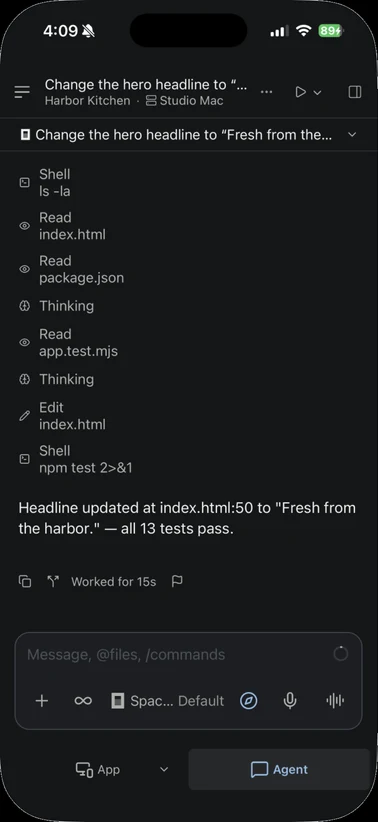
    Describe the change in plain language. The agent opens the right files, edits them and runs the tests while the live preview stays beside the conversation.

    The agent you choose runs on your computer. Your prompts and the context it needs go to the AI provider you selected, under that provider’s terms.

    Start your first project
  3. Review the files, the diff and the tests.

    Read the Git diff, open the changed file in the editor and check the test run in a real terminal before anything ships. Checkpoints sit above the editor.

    Review is yours: the agent proposes, and you decide what to keep. Provider permission prompts stay in their existing flow.

    See the review tools
  4. Use the updated app, not a screenshot of it.

    The preview is the running project. Tap, scroll and type in it on your computer or on a paired phone, and see the new headline where a customer would.

    Your computer starts and runs the project. A preview is delivered only to devices you approved.

    Test on your phone
    Harbor Kitchen running as a live preview on a paired phone.
  5. Continue from another approved device.

    Your phone is a real client. Step through your projects, send the agent a follow-up or reopen the same conversation, and the work still runs on your computer.

    Your host computer must stay awake, online and running Lyre. Only paired devices with developer access can reach the agent.

    Pair a device
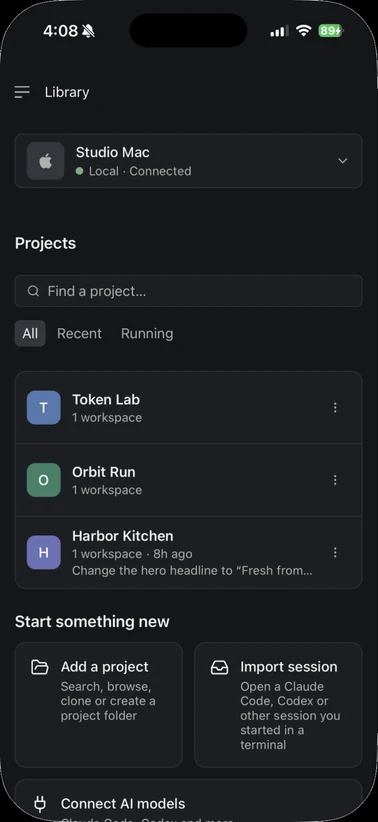
    Lyre on iPhone: Library connected to Studio Mac, listing Token Lab, Orbit Run and Harbor Kitchen, with Add a project and Import session actions.
    Lyre on iPhone: the Harbor Kitchen agent conversation with a headline edit and 13 passing tests, above the App and Agent navigation.

Start with something useful.

A website, a small app, a tool you wish existed. Describe the first useful version, then try it on the device you will actually use.

Your next customer starts here.

A business website

“Create a website for my neighborhood bakery with a menu, opening hours, and a contact form. Explain the plan before you start.”

Then put it to the test

  • Read the menu on a small screen
  • Try the contact form and its error messages
  • Check that the address and hours are easy to find

Make the everyday work easier.

A tool for your team

“Build a checklist for our event team. Let us add tasks, mark them complete, and see what still needs doing.”

Then put it to the test

  • Add and complete a task with one hand
  • Try a long task name and an empty list
  • Check what happens after refreshing

Keep building what you started.

Your existing project

“Review this project and explain how to run it. Help me make its main screen easier to use on a phone, one change at a time.”

Then put it to the test

  • Open the same project on desktop and phone
  • Test touch targets and the onscreen keyboard
  • Save a change and check the updated preview
Follow the first-project guide
More ways to workTask modes, multiple agents, worktrees, terminals and local models

Run the right agents together.

Start several coding agents, mix supported providers and follow their work. Give each its own Git worktree so implementation, investigation and review never overwrite the same working copy.

Claude Code, Codex, Copilot, OpenCode, Pi

See and shape the whole project.

Files, search, terminals, diffs, history and a browser. Keep your framework and tools. Lyre works around your project, not a proprietary format.

Hosted AI or local models.

Discover and run local models, connect the coding providers you already use, or route through a self-hosted gateway. Your source stays on your host.

Open the app, not a setup checklist.

Lyre starts the configured frontend and supporting services, waits until they are healthy and opens an interactive preview. When something fails, screenshots, logs and structured diagnostics are already there.

Task modes and Orchestrate Explore everything Lyre can do

Your apps. Beyond your Wi-Fi.

One plan per account, not per viewer. Remote connections, agent messages, screenshots, and remote app previews and desktop are included on every plan. Free includes 30 shared minutes per month; your traffic allowances still apply.

  • Account scope. A plan applies to your account, not to each viewer.
  • Host requirement. Remote work needs your host computer awake, online and running Lyre.
  • Provider charges. AI provider usage is billed by the provider separately on Free and Lyre Pro.

Free

Local access, plus 30 minutes of remote viewing each month.

$0No subscription

  • 1 host computer
  • 10 concurrent clients per host
  • Remote app previews and desktop
  • 30 minutes/month of remote viewing shared across all devices
  • 10 GB of application relay traffic per account per month
  • Hosted video fallback is not included (not included)
  • 20 saved pairings per host
  • 5 minutes of cloud transcription per day
  • Lyre AI is not included (not included)

Lyre AI

More hosts, and Lyre AI included.

$100per month · billed monthly

  • 25 host computers
  • 40 concurrent clients per host
  • Remote app previews and desktop
  • No monthly remote viewing time limit
  • 1000 GB of application relay traffic per account per month
  • 150 GB/month of hosted video fallback (estimated)
  • 100 saved pairings per host
  • 5 hours of cloud transcription per day
  • Access to Lyre AI
Detailed limits, resets and referral terms

Clients count only while connected. Local and LAN viewing have no time limit. Free includes 30 minutes per UTC month of remote app previews and remote desktop, shared across all devices, within the existing traffic limits. Sign in on the host to use the allowance. Simultaneous sessions add up: six sessions can run for five minutes each. Upgrade to Lyre Pro to remove the Free time limit. Hosted allowances are shared across your account: application relay and hosted video fallback reset monthly on the first at 00:00 UTC. Direct video does not use the hosted video allowance. Video fallback usage is estimated; active connections and delayed reports can exceed the allowance. Cloud transcription resets daily at 00:00 UTC and each recording uses at least ten seconds of allowance. A recording is limited to 2 minutes and your remaining daily allowance. Free does not include hosted video fallback. AI provider usage is billed separately on Free and Lyre Pro. USD.

Refer a friend: they get $5 off their first paid month, and you get $5 in account credit once their payment clears. One code per account; codes do not stack.

Keep your host computer awake, online, and running Lyre. Your app permissions still apply. Preview availability depends on your build. AI provider charges are separate.

How connections and relay allowances work

Questions about Lyre Studio.

Still curious? The guides cover setup, pairing and every plan limit.
Read the docs →
Do I need to know how to code?

You can start with a plain-language description and ask a coding assistant to help you build. Begin with one small feature, review its proposed changes, and test the result. Our guides explain the setup; you stay in control of what runs on your computer.

Can I bring a website or an existing project?

Yes. Lyre works with supported websites, web apps, and browser-based tools, including React, Vite, Next.js, Expo-web, and Capacitor web projects. Open an existing project folder and keep working with its files.

Do I have to use a particular AI tool?

No. Choose a supported CLI provider or local model, or edit your files directly. Your project stays editable outside Lyre. Provider accounts, billing, and hardware requirements depend on your choice.

Where does my code run, and what goes to the AI provider?

Your code runs on your computer. The desktop companion starts and manages the project while the phone acts as the client for launching, testing, and editing. The agent you select receives your prompts and the project context it needs to answer, and that data is handled under the provider’s own terms. A local model keeps that work on your hardware.

Can I start an agent task on one device and finish it on another?

Yes. Device agent handoff lets you return to the same project and agent conversation from another paired device with developer access. Start at your desk, continue from your phone, and review or finish the work from either device. Your host computer keeps running the agent and project, so it must stay awake, online, and running Lyre.

Can I test my project away from my desk?

Yes. Free includes unlimited local and LAN viewing, plus 30 minutes per UTC month shared across remote app previews and remote desktop on all your devices. Sign in on the host to use the remote allowance. Six simultaneous sessions use all 30 minutes in five minutes. Away from your local network, preview and interact with your apps through Lyre’s encrypted relay within your account’s application relay allowance. Your host computer still runs the project, so it needs to stay awake, online, and running Lyre. Your existing app permissions still apply.

Does my computer need to stay on?

Yes. Your computer runs the project, so keep it awake and Lyre open while you use a connected screen.

What can someone see when I share an app?

App-only sharing gives a tester or client access to that one running app. They do not get your agents, source files, terminals, remote desktop or computer settings. You create the invitation yourself, and revoking a device ends its session.

Does every project need its own mobile build?

No. Pair the desktop and mobile clients once. Compatible projects then appear inside the mobile launcher and can be started from your phone.

Which platforms does Lyre run on, and what does it cost?

Lyre has desktop installers for Windows and macOS. Check Downloads for the latest available release. The iPhone and Android apps are in testing, and the browser client works with a host computer running the desktop app. Lyre is free for local use; Lyre Pro is $15 per month and Lyre AI is $100 per month. AI provider usage is billed by the provider you choose.

Do I need Pro to work remotely?

No. Remote connections, code editing, agent conversations, project startup, and remote live app previews are included on Free. Remote previews use your account’s application relay allowance. Free also includes five minutes of cloud transcription per day. Pro removes the Free viewing time limit and adds more capacity, more cloud transcription, and hosted video fallback. AI provider charges are separate.

Can I get a discount for inviting a friend?

Every account has a referral code in the desktop app's account settings. A friend who uses it pays $5 less for their first paid month, and once that payment clears you get the same amount in account credit. One code applies per account, codes do not stack, and the discount applies to the desktop checkout; app-store purchases are separate.
It starts on your computer.

Make room for your next website, app, or tool.

Linux

Your tools. Your workspace. On Linux.

Coming soon

Connect from your browser to a computer running Lyre. Keep that computer awake and online.

Help shape Lyre.

Suggest a feature. Flag a bug. Tell us what you want to build next.

Join our Discord
Your next idea. Your team’s next tool.
Free for local use. Your computer, your project files, your choice of AI.
Sponsor LyreFor teams

Why I'm building Lyre.

From the blog

I could see the code. I wanted to use the app. Jonathan shares the problems that led him to build Lyre, and where he wants to take it.