Explainer · Agents
How orchestration works in Lyre
What agent orchestration is, why it matters, and how Lyre puts it to work.
Modern AI tools rarely stop at one model doing one thing. A single request can turn into a plan, several smaller jobs, and a review of the result. Orchestration is how a system keeps control of that: it decides which model plans the work, which models carry it out, and how the pieces run without colliding.
This post explains what orchestration is, why it matters, and how Lyre implements it, using the running app and the screenshots below. You do not need to use Lyre to follow it.
The idea in plain language
An AI agent is a program that uses a model to take actions toward a goal. It can read files, run commands, write code, and check its own work, not just produce text.
One agent is useful. But many real tasks are bigger than a single thread of work:
- A task can be long enough that it helps to split it into parts.
- Different parts can sometimes run at the same time instead of in a line.
- Different models are good at different things, and you may want a strong model to plan while faster or cheaper models do the smaller jobs.
- The work may not all live on one computer.
Orchestration is the way those pieces are coordinated. At its simplest it means two roles:
- An orchestrator: the model that reads the goal, plans, and hands out work.
- Sub-agents: the agents that receive a piece of the plan and do it.
Orchestration is not one specific product feature. It is a pattern that shows up anywhere several models or agents cooperate. Lyre's job is to make that pattern visible and controllable instead of hiding it inside a black box.
Why you would want it
Orchestration is meant for work that is too large or too varied for one model in one pass. A few everyday reasons:
- Break a big task into smaller ones. "Add tests, update the docs, and fix the failing build" is easier to divide than to do in one shot.
- Use the right model for each job. A larger model plans; smaller or local models handle well defined pieces.
- Work in parallel. Two independent tasks can run at once instead of waiting in a queue.
- Spread work across machines. A powerful desktop can take the heavy part while a laptop handles something light.
- Keep the human in the loop. You can see the plan, the agents, and the result instead of trusting a single opaque answer.
The trade off is coordination. More agents means more places for work to collide, so an orchestration system also has to keep each agent's changes separate and keep permissions clear.
A few terms
- Model: the AI that generates text or decisions.
- Provider: the service or runtime that serves a model, such as a hosted API or a model running on your own computer.
- Host: the computer running Lyre and the actual work.
- Worktree: an isolated copy of a project on its own branch, so two agents can edit at once without overwriting each other.
Where it lives in Lyre
Open Settings, choose your host, then open Agents. The orchestration controls are grouped under Model orchestration.
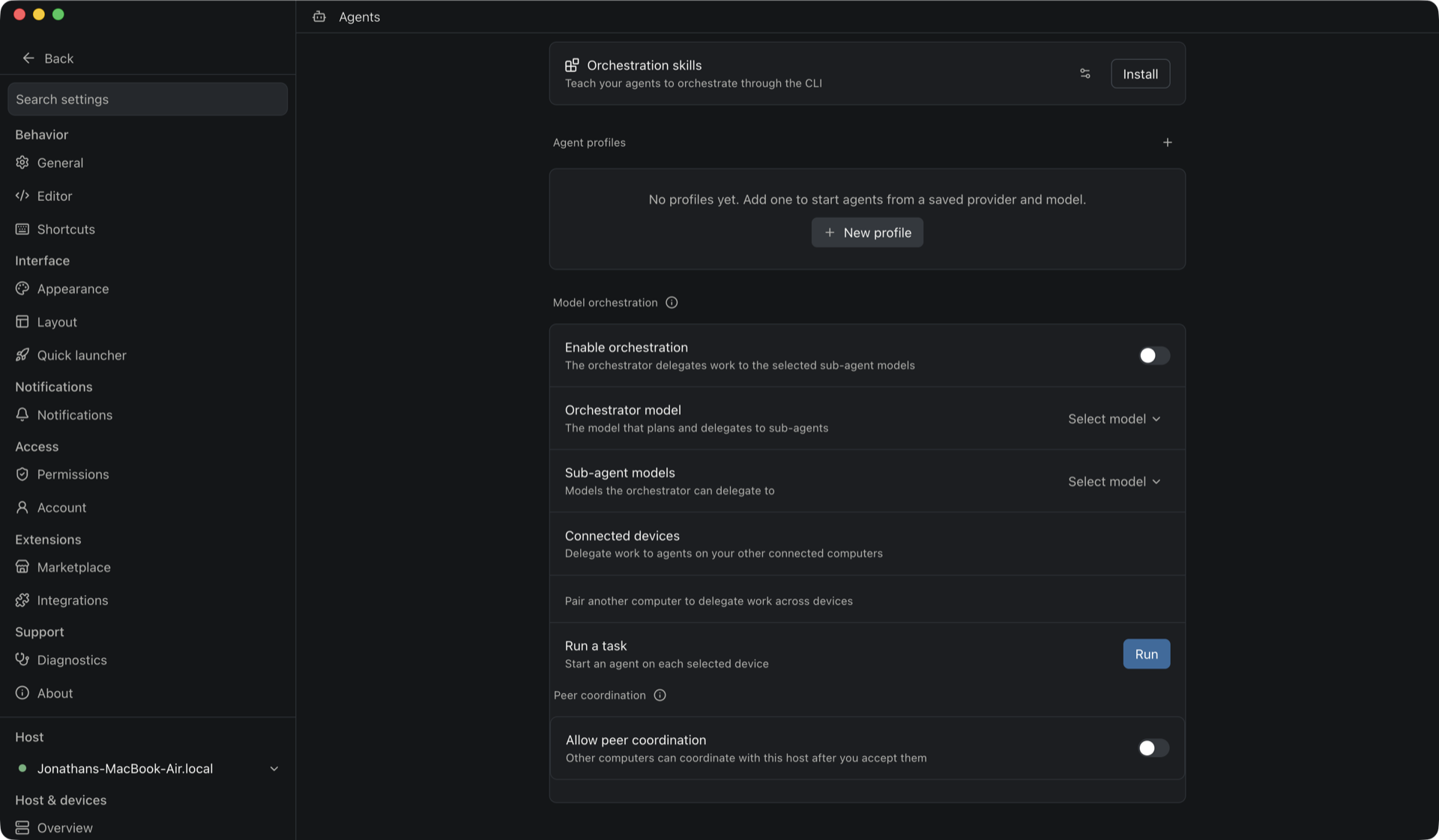
Choosing the orchestrator and sub-agents
Under Model orchestration:
- Enable orchestration turns delegation on for the host.
- Orchestrator model is the model that plans the work and decides what to hand off.
- Sub-agent models are the models the orchestrator is allowed to delegate to.
When orchestration is on, an orchestrating agent can ask Lyre which models it may use and then start sub-agents with them. The choices are saved on the host, so the same setup applies to new conversations. If you turn orchestration off, the saved choices stay in place but are not offered to agents.
Two related pieces sit just above it:
- Orchestration skills installs a skill that teaches agents to orchestrate through the Lyre command line, so an agent can create and manage the pieces it needs.
- Agent profiles let you save a provider and model pair, so an agent can be started from that preset instead of configuring it each time.
Working across computers
Orchestration is not limited to one machine. On the same page, Connected devices lets you:
- Run a task on each selected device.
- Pair another computer so it can take part.
- Allow Peer coordination, so other computers can coordinate with this host after you accept them.
In a conversation, typing /orchestration opens the
Run across devices sheet. You choose the connected computers, give each
one the models it may use, write a task, and optionally
Split work with the orchestrator. When you run it, Lyre starts an agent
on each selected device. With splitting on, one short planning agent on the orchestrator
host turns the task into separate pieces first, and those pieces are handed to the
devices.
This is a deliberate boundary: a computer appears here only after you pair it, and pairing a device for viewing an app does not give it agent or source access.
Orchestration in the workspace
The workspace is where the result shows up. A single workspace can hold many tabs, including Agent, Terminal, Changes, Diff, Files, Browser, and Preview, so the agents, the code they changed, and the running app stay together.
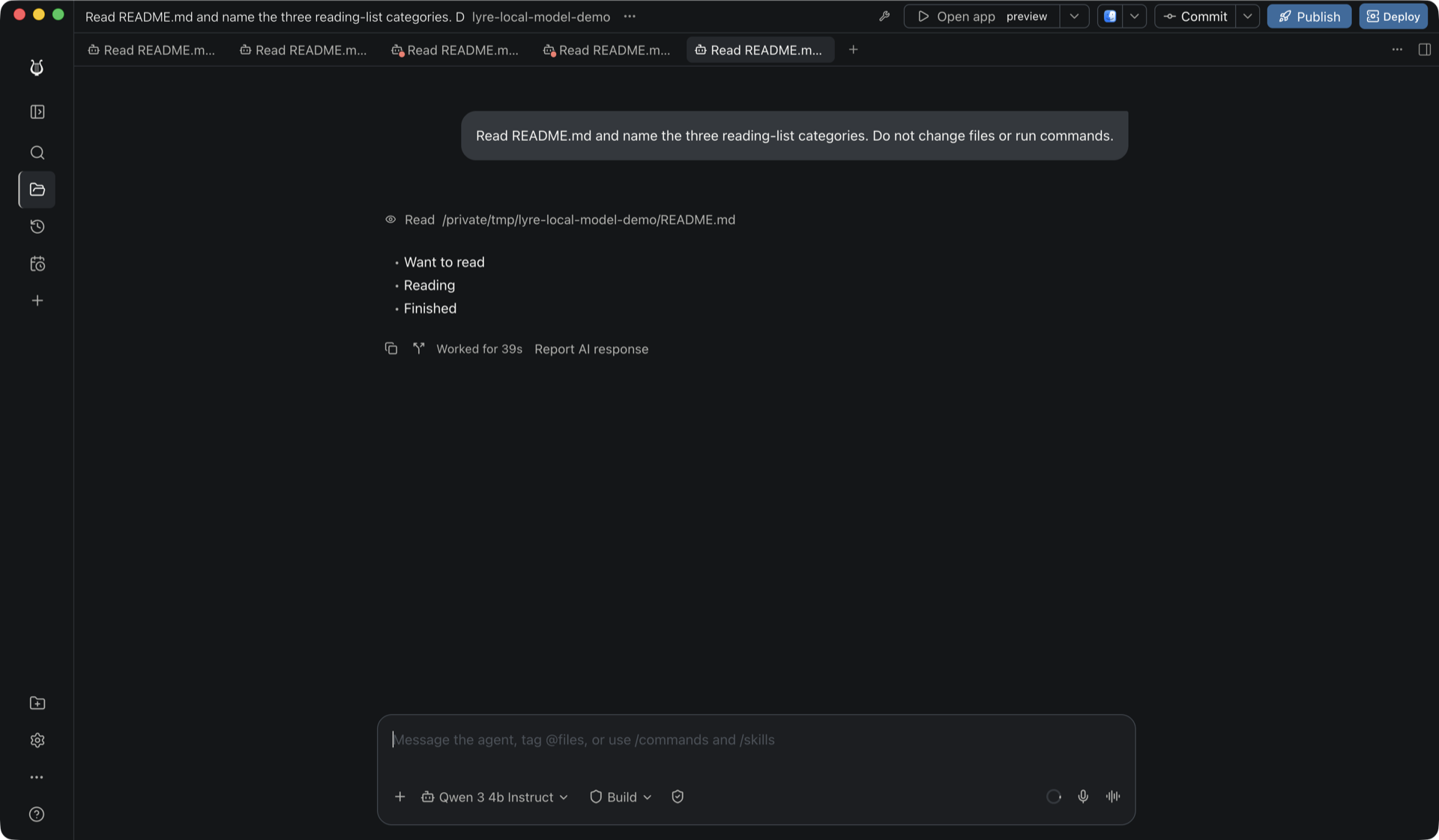
In the capture above, an agent ran against a local project, read a file, and returned the result, all inside a workspace that can also open the running app.
For genuinely parallel work, create a workspace with Isolation: New worktree on the New workspace screen, or use New worktree on a project in the sidebar. Each worktree is its own checkout, so two agents can work at the same time without stepping on each other. That isolation is what makes running several agents safe rather than chaotic.
What orchestration is for
Put together, this is the intended shape of the feature:
- You describe a goal.
- A chosen model plans it.
- The plan is split across the sub-agent models you allowed.
- Each agent works in its own workspace or worktree.
- You watch and review the result, then iterate.
It is most valuable when a task is large, benefits from parallel effort, or needs different models for different stages. For a quick one line question, a single agent is still the simplest choice, and orchestration adds nothing.
What to keep in mind
- Orchestration is a host setting. It grants no extra access to a device that was only paired to view an app.
- Cross-computer work needs those computers paired and online, and the host stays the authority.
- The host runs the models and the work. A hosted provider still processes whatever you send it.
- More agents means more coordination, so review the plan and the diffs rather than assuming the result is correct.
Orchestration is one of the parts of Lyre that is still moving quickly. The screenshots show the current build, and the settings are the best place to see exactly what your host supports today. But the underlying idea is not specific to Lyre: whenever several models or agents cooperate on one goal, something has to decide who plans, who acts, and how their work is kept apart.