Share a local app with a tester
Invite a tester to one live app with App-only access, check it on their device and revoke access when testing ends.
On this page
Can someone test my local app without development access?
Yes. Use Lyre's Share app action to create an App-only invitation for the selected app. The tester interacts with the app running on your computer; they do not receive agents, source files, terminals, host settings or desktop access. The host must stay awake, online and running Lyre and the app while they test.
Share one app with built-in invitations
Share app is built into Lyre. Select one supported app on its host, create an invitation and let a tester open it from a compatible phone, tablet or browser client. Lyre handles invitation redemption and host-authorized App-only access; the tester does not need source files or Developer access.
This is a private live-preview workflow. You do not need a public development-server URL, a separate public tunnel or a source repository invitation. Keep the selected app and host running, and use current device support and preview requirements to choose the tester's client. Your app's own sign-in, if any, remains separate from Lyre connection authorization.
Sharing a preview does not distribute an iOS or Android native app binary. The selected app needs a supported, prepared preview target; this does not make every desktop or native application shareable. For installable releases, follow the separate publishing workflow.
Confirm the selected app and App-only access before creating the invitation. Verify a real interaction on the tester device, then revoke the grant when testing ends. A link-ready message is not evidence of a working client connection.
Prepare one working app
- A compatible Lyre host and tester client. Check current downloads and device support; use the browser client or a supplied compatible phone client.
- A project that opens and responds in its live preview. Configure its startup command before inviting anyone.
- Owner authority, or an explicit host-granted Share app permission for the approved project. Developer access alone does not automatically permit sharing.
- A tester who is ready to redeem a private, single-use invitation within five minutes.
App-only access is for testing the selected app. Developer access permits agents, source and terminals for approved projects and is a different grant. The tester does not need a coding-provider account to use the shared app. AI provider costs for building or changing it remain separate from Lyre; any services your app calls have their own costs.
For off-network testing, check the host account's application relay allowance and current plan limits. Verify the remote route before relying on it; connection checks cover local and off-network testing.
Create the App-only invitation
-
Review the app and access
In the intended project's workspace, choose Share app. Check the computer and resolved app. If Share as is offered, choose Viewer and confirm App-only access. Opening this sheet does not create an invitation.
-
Name the tester
Enter a recognizable name such as Alex's test phone. This helps the owner identify the grant when testing ends.
-
Create, then share privately
Choose Create invitation, then show the QR code or use Copy link. Have the tester open the invitation on their device and accept the displayed app access. Follow the sharing guide for these controls.
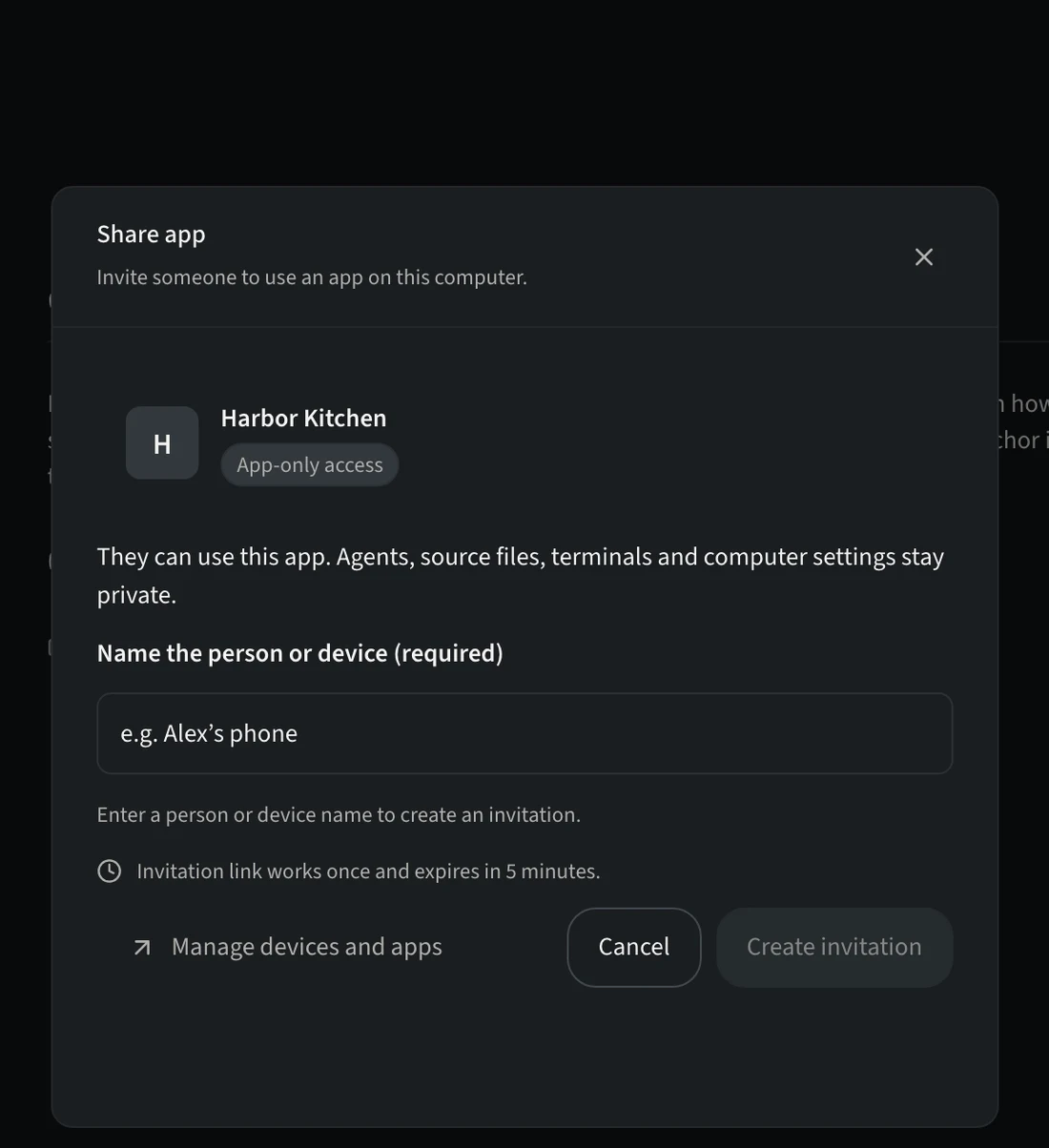
The link works once and must be redeemed within five minutes. Granted access lasts until it is revoked. Letting the link expire after redemption does not remove the tester.
Example: give the tester a reproducible task
Send a short test brief separately from the private invitation. For a demonstration restaurant app, a useful example is:
On your phone, open the shared restaurant app and find its menu.
Choose a category, then return to the full menu.
Tell me the phone and browser or client you used, the steps you took,
what you expected, and what actually happened.
Use test data and do not submit a real order or payment.
Adapt the steps to features your app actually implements. Ask for a screenshot of the failure when useful, with personal data removed. App-only testers give feedback to you; they cannot open your coding-agent conversation. You can review their report and pass the relevant context to your agent.
Check the tester experience
-
Observe a real interaction
Have the tester open the named shared app and complete the agreed action. A copied link, an invitation-ready message or a running host process does not prove the app works on their device.
-
Check the access boundary
Use a test device with only the App-only grant. Confirm that the shared app is reachable and agent conversations, source files, terminals and desktop controls are unavailable. A device with a separate Owner or Developer grant cannot demonstrate the App-only boundary.
-
Test outside the local network if needed
Repeat the app interaction with the tester on mobile data or another outside network. Keep the host online. Local success alone does not verify the remote route.
The tester can use the intended app on their device through the intended connection, stays within App-only access, and can report a reproducible result.
Recover a failed invitation or preview
- Share app is missing or the app is unavailable
- Check sharing authority with the host owner. Start or prepare the intended app on its computer, confirm its live preview, then reopen Share app. See preview recovery.
- The invitation expired or was already used
- Review the grant list first. If a fresh invitation is needed, create one for that tester and app, and have the tester redeem it within five minutes.
- The invitation result is unknown
- Review invitations in Manage devices and apps before creating another. A timeout does not prove invitation creation failed.
- The app stops responding on the tester device
- Check that the host is awake and online, the app is healthy and the tester still has its grant. Restore connectivity before retrying. Use host recovery and the actual preview error; do not expose the development server publicly as a shortcut.
Revoke access when testing ends
The host owner chooses Manage devices and apps in Share app, or opens Pair device, selects the tester's grant and uses Revoke. Read the confirmation for the exact grant. See stop sharing.
After revocation, verify on the tester's device that the affected shared app no longer opens or responds through that grant. Closing the viewer, stopping the app or deleting the phone client does not revoke access. Other grants held by the same device remain separate.